What is content clipping?
Content clipping is the work of turning a podcast, stream, interview or long video into short, standalone clips for YouTube Shorts, Instagram Reels and TikTok.
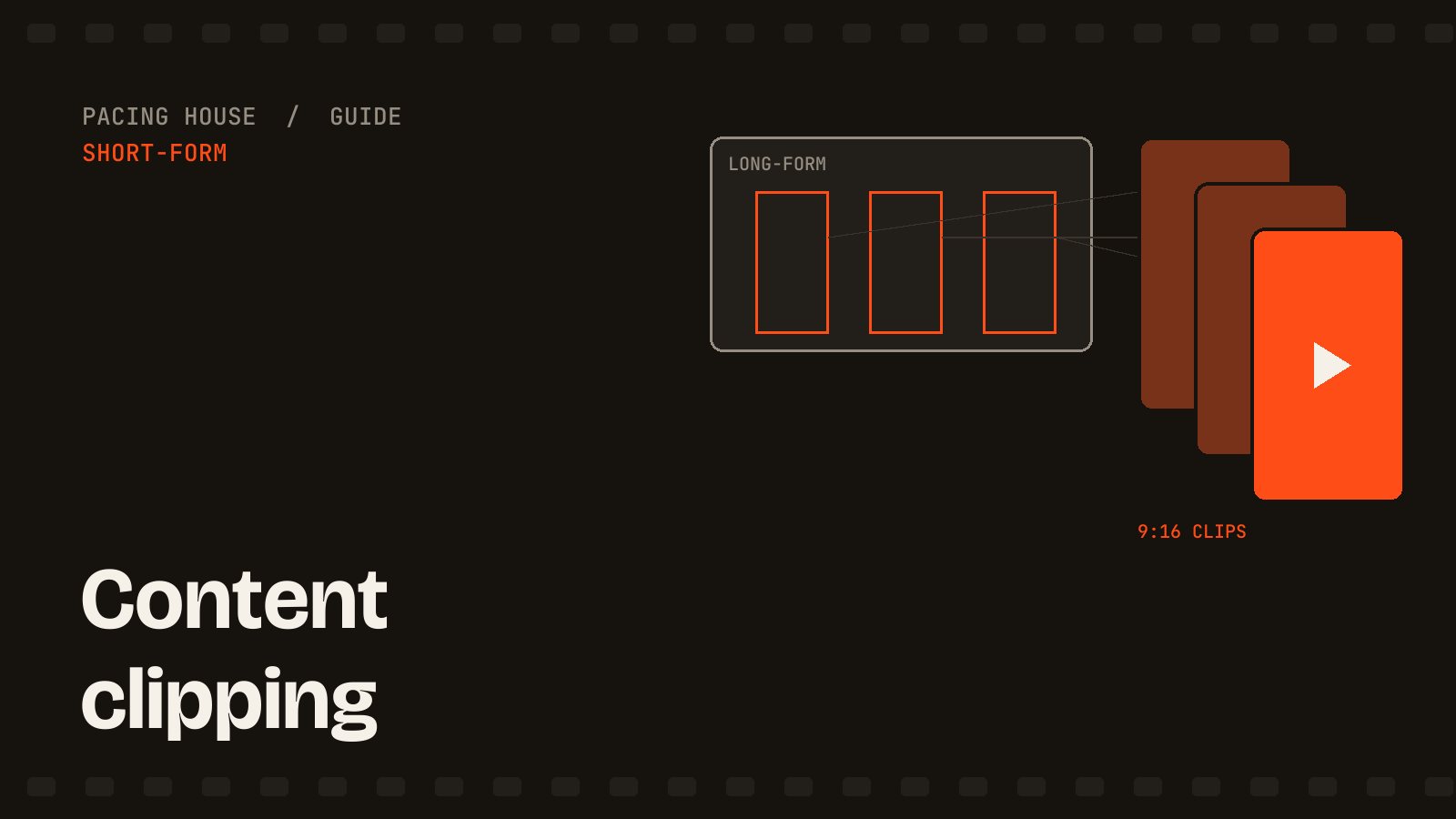
The word clipping can also mean audio distortion, image masking or saving a screen capture. In the creator economy, content clipping has a more specific meaning: finding a moment inside long-form footage and rebuilding it as a short video that makes sense to someone who never saw the original.
A finished clip is usually vertical, captioned and under 90 seconds. It may come from a two-hour podcast, a livestream, a webinar, a YouTube essay or an interview. The source supplies the idea. The video clipper supplies the selection, structure and edit.
What does a video clipper do?
A video clipper works through six connected jobs:
- Review the source. Watch the recording or read its transcript.
- Select complete moments. Find stories, strong opinions, useful answers, reactions or clear lessons.
- Build the hook. Start on the line that creates curiosity instead of preserving the original chronology.
- Tighten the edit. Remove filler, repeated thoughts, long pauses and unnecessary setup.
- Reframe and package. Convert horizontal footage to 9:16, track speakers, add b-roll and create readable captions.
- Export clean versions. Deliver watermark-free clips within the safe areas for Shorts, Reels and TikTok.
This is different from taking a random 30-second section and posting it unchanged. A useful clip has its own beginning, middle and payoff.
What makes a good content clip?
The source moment matters more than effects. A strong clip normally contains at least one of the following:
- A clear claim people can understand immediately.
- A surprising result, number or lesson.
- A story with tension and a payoff.
- A useful answer to one specific question.
- An authentic emotional reaction.
- A demonstration that becomes clearer with visuals.
The selection also needs context. If a viewer must know what happened ten minutes earlier, the moment is not ready to become a standalone clip. The editor must add the missing setup, restructure it honestly or choose another moment.
How long-form video becomes a short clip
Suppose a podcast guest gives a useful answer over three minutes. The strongest sentence appears after 40 seconds, followed by an example and a concise conclusion. A clipper can open on that strongest sentence, return briefly to the necessary setup, use the example as proof and end on the conclusion.
The edit may use jump cuts, speaker punch-ins, b-roll and animated captions, but those elements support the idea. They cannot rescue a weak or incomplete moment. For a repeatable selection and production workflow, see how to turn one podcast into a month of Shorts.
AI clipping tools versus a human clipper
An AI clipper can transcribe a recording, detect speaker changes, remove silence and suggest highlights. That makes AI clipping tools useful for the first pass, especially when the source is several hours long.
The limitation is judgment. A high-energy sentence is not automatically a complete story. Keyword frequency does not show whether the speaker is joking, correcting an earlier claim or quoting someone else. Automated captions and reframing also need review.
A practical workflow uses both:
- Use AI for transcription, search, silence detection and rough reframing.
- Use a human for selection, context, hook structure, rhythm, visual emphasis and quality control.
If you want those decisions handled for you, see Pacing House's video clipping services.
How do content clippers get paid?
There are three common models:
- Per clip: a fixed price for each approved edit.
- Monthly retainer: a fixed number of clips delivered from recurring recordings.
- Performance campaign: compensation based on eligible views or another result defined by the campaign.
In a clipping campaign, participants usually receive approved source material and publishing rules. Before starting, check who owns the footage, which accounts may publish it, how views are verified, what content is prohibited and when payment happens. Do not download and repost somebody else's content simply because it is public.
How to start clipping videos
- Choose one source format. Podcasts, gaming streams and educational YouTube videos require different instincts.
- Practice selection first. Mark ten candidate moments in one long video before opening an editor.
- Edit three versions. Test different opening lines and lengths to see how the same idea changes.
- Learn vertical framing. Keep faces, titles and captions away from platform interface elements.
- Build a small portfolio. Use your own footage or obtain permission. Label practice work accurately.
- Choose a payment model. Work per clip, retain a client monthly or join a legitimate campaign with written terms.
You do not need every transition or plugin. You need to recognize an idea worth watching, preserve its meaning and remove everything that slows it down.
Content clipping FAQ
Is video clipping the same as video editing?
Clipping is a type of video editing focused on selecting moments from existing long-form footage and turning them into short, standalone videos. Video editing also includes original long-form production, color work, audio finishing and many other formats.
Can AI clip a two-hour video automatically?
It can produce candidates, but review them before publishing. Check whether the hook is honest, the point is complete, the captions are accurate and the crop follows the correct speaker.
Can one clip be posted everywhere?
A clean 9:16 master can usually be used on Shorts, Reels and TikTok. Keep text in safe areas, remove watermarks and adapt the post caption for each platform.
Is content clipping legal?
Use footage you own, footage a client authorizes or source material provided under clear campaign terms. Public availability alone does not grant permission to edit and redistribute a video.